Images
Created:
Picture by exiguus
How images work in mono/plain and how to use them in posts and templates
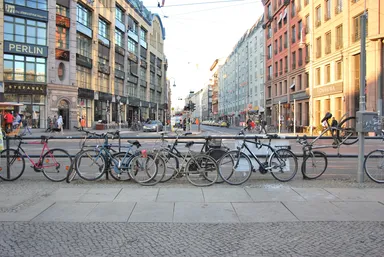
Rosenthaler Straße as seen from Hackescher Markt. DIE HACKESCHEN HÖFE are located between Alexanderplatz and Friedrichstraße, not far from the Scheunenviertel in Berlin Mitte. These residential and commercial courtyards have been designated historic landmarks since 1972. In addition to residential and office spaces, retail stores offering artistic and culinary experiences round out the picture.
Introduction
This post explains how images are handled in the mono/plain theme:
- where image files should live,
- how to render them in posts,
- how resizing and
srcsetare generated, - and how templates/macros build gallery and header images.
The key idea: the theme supports both colocated image paths and page-relative paths, depending on where the image is rendered.
Content Structure
For best results, keep the post and its image files together:
content/
  posts/
    my-post/
      index.md
      hero.jpg
      photo-01.jpg
      photo-02.jpg
That layout works with the theme image shortcodes and gallery helpers without hardcoded global paths.
Images in Post Front Matter
The theme uses these optional front matter fields:
[extra]
hero_img = "hero.jpg"
hero_alt = "Sunset skyline over a river"
hero_copy = "Hackesche Hoefe in Berlin-Mitte"
preview_img = "hero.jpg"
images = ["photo-01.jpg", "photo-02.jpg"]extra.hero_img: shown in the post header (templates/components/post_header.html) and it is the fallback for the Open Graph preview image.extra.hero_alt: optional alternative text forextra.hero_img.extra.hero_copy: optional caption text shown below the hero image.extra.preview_img: used first for Open Graph preview generation.- If
extra.preview_imgis missing, Open Graph falls back toextra.hero_img. extra.images: used by gallery-related templates to render thumbnails. It is also used by the latest images component, so the same image list can drive both post content and gallery views.
Images in Markdown Posts
There are two common ways:
1. Standard Markdown Image
Use this when you want plain Markdown behavior. No lazy-loading or responsive srcset is generated. The image path is resolved relative to the page's location, so it works with colocated content or global paths.
2. Theme Image Shortcode (Responsive)
{{ image(src="photo-01.jpg", alt="A calm city skyline at dusk") }}When used without explicit width/height, this calls the responsive image macro and generates srcset variants based on theme config.
If you want a fixed output size:
{{ image(src="photo-01.jpg", alt="A calm city skyline at dusk", width=800, height=450) }}With width and height set, the shortcode uses a fixed resize path.
Config Extra
Image behavior is controlled in config.toml:
[extra]
image_resizing_disabled = false
image_format = "webp"
image_quality = 80
images_default_size = 256
images_sizes = [256, 384, 512, 576, 640, 768, 1024, 1152]
thumbnail_quality = 70
thumbnail_default_size = 128
thumbnail_sizes = [128, 256]
image_resizing_disabled = truedisables responsive transformation and uses original file paths.image_format,image_qualitycontrol generated responsive images.thumbnail_quality,thumbnail_sizes,thumbnail_default_sizecontrol generated thumbnail images.
Post/Page Extra
This is the image-related extra configuration you can use per page/post front matter:
[extra]
hero_img = "hero.jpg"
hero_alt = "Sunset skyline over a river"
hero_copy = "Hackesche Hoefe in Berlin-Mitte"
preview_img = "hero.jpg"
images = ["photo-01.jpg", "photo-02.jpg"]hero_img: post header hero image (templates/components/post_header.html).hero_alt: post header image alt text. If missing, it falls back to page description and then page title.hero_copy: post header figcaption text. If missing, it falls back to page description and then page title.preview_img: Open Graph image (templates/macros/opengraph.html).images: image list for gallery/latest image components.
Resolution behavior:
- Post header currently uses
images::responsive_image(path=page.path, src=page.extra.hero_img, ...). - Open Graph currently resizes relative image paths using
page.path ~ <image-name>. - The
imageshortcode usespage.colocated_pathand is best used with colocated post bundles.
How Templates Handle Images
The implementation lives in templates/macros/images.html and is reused across pages.
Core Macros
image(...): plain/fixed image output.responsive_image(...): generatessrcsetusingresize_image(..., op="fit_width").responsive_thumbnail(...): generates thumbnail variants usingresize_image(..., op="fit"|"fill").
Post Header
templates/components/post_header.html renders extra.hero_img as a responsive image inside a figure.
Gallery and Latest Images
templates/pages/gallery.html, templates/components/latest_images.html, and templates/components/post_latest_images.html iterate over post.extra.images and render each with responsive_thumbnail(...).
Template Usage Examples
In templates, import and call the image macros like this:
{% import "macros/images.html" as images %}

{{/* images::responsive_image(
  path=page.colocated_path,
  src="photo-01.jpg",
  alt="A calm city skyline at dusk",
  default_size=384,
  sizes=[384, 576, 1200]
) */}}
Thumbnail usage:
{{/* images::responsive_thumbnail(
  path=post.colocated_path,
  src="photo-01.jpg",
  alt=post.title,
  default_size=128,
  sizes=[128, 256]
) */}}
Practical Workflow
- Put post text and image files in the same colocated post directory.
- Use
extra.hero_imgfor a hero image. - Use
extra.imagesfor gallery/latest image blocks. - Use
{{/* image(...) */}}shortcode in Markdown when you want responsive behavior in body content (best with colocated bundles). - Tune
images_sizesandthumbnail_sizesin config for your performance and quality targets.
Summary
Images in mono/plain are driven by reusable image macros and a mix of path strategies (page.colocated_path and page.path) depending on template context. Responsive behavior remains centralized in one macro file.
Feedback
Have thoughts or experiences you'd like to share? I'd love to hear from you! Whether you agree, disagree, or have a different perspective, your feedback is always welcome. Drop me an email and let's start a conversation.